I wanted to find out how much useful AI infrastructure a small company could run on one machine, without turning every document, draft, and internal conversation into somebody else’s cloud data.
The answer is: quite a lot. But the interesting part is not the model or the graphics card. It is the system around them: where data lives, who can reach it, what an agent is allowed to do, and how the whole thing recovers after a bad update or an unattended reboot.
The brief
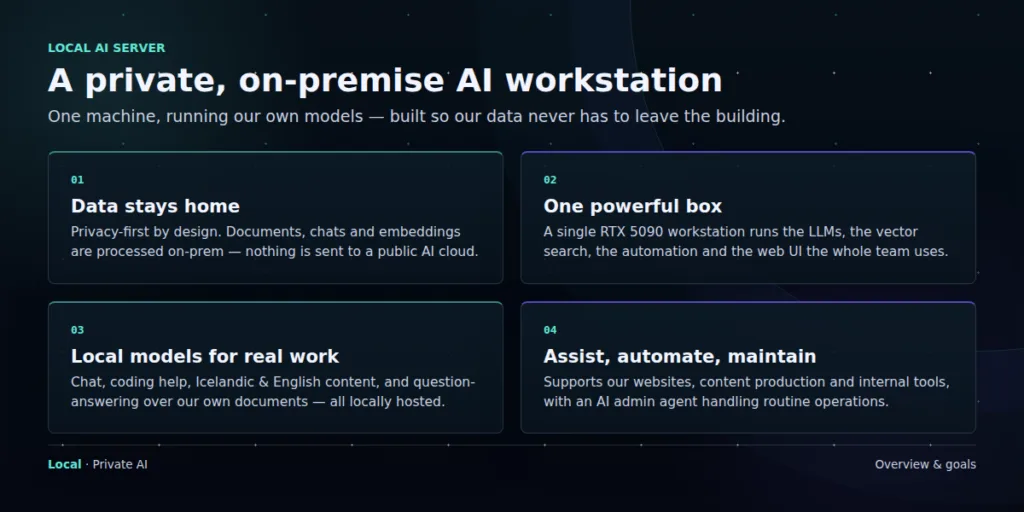
This was never a project about owning the biggest model. I wanted a private system that could work in Icelandic and English, help with code and content, search company documents, maintain websites, and take care of routine operations.
The useful question is not, “What is the largest model we can run?” It is, “What work can we trust this system to do?”
That last word matters. Trust does not come from keeping a model in the building. It comes from access rules, visible logs, separate data spaces, backups, and clear limits on what each agent can do.
The machine sets the boundary
The workstation is built around an NVIDIA RTX 5090 with 32 GB of VRAM. It also has a Ryzen 9 9950X, 128 GB of system memory, fast NVMe storage, an archive drive, and a 1350 W power supply. Those parts support the platform, but GPU memory sets the practical limit.
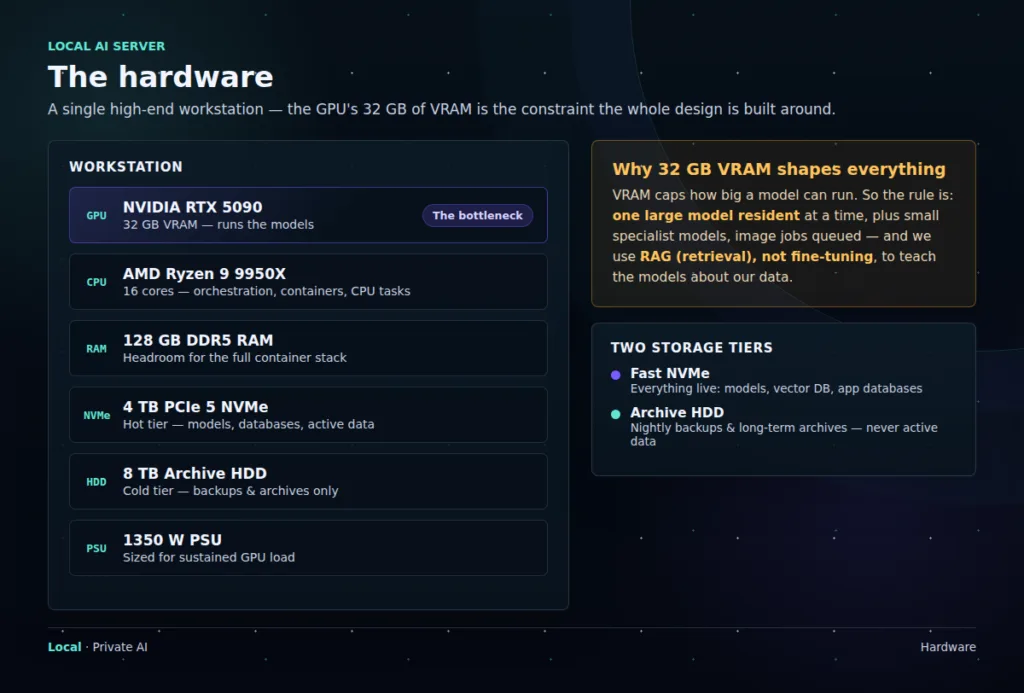
A model that fits in VRAM feels immediate. A model that spills into system memory does not. In normal use, one larger model stays loaded while smaller specialists handle narrow jobs. Image generation is queued so it does not fight the language model for memory.
The same thinking applies to storage. Models, live databases, and active vector indexes belong on NVMe. The larger hard drive is for backups and long-term archives. It has plenty of capacity, but I do not ask it to behave like a database disk.
The main technical choice: company knowledge is retrieved when a question is asked. It is not baked into a fine-tuned model.
Retrieval uses less GPU memory, costs less to maintain, and lets us update or remove source material without retraining anything.
One system, split in two
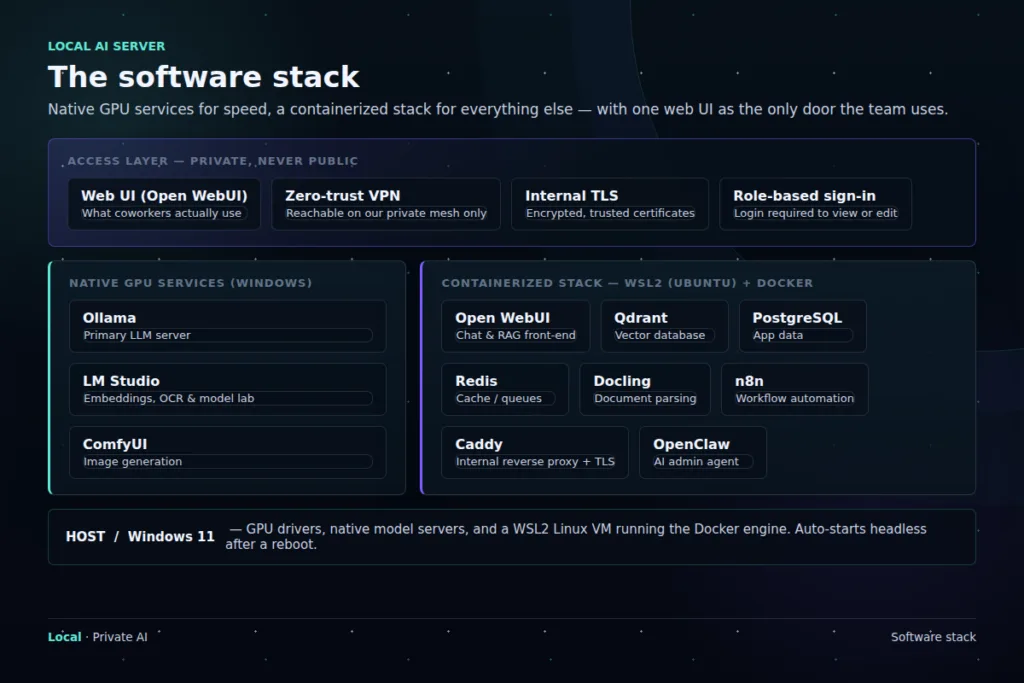
The software stack has an intentional divide. Services that need direct GPU access run natively on Windows. The rest runs in WSL2 and Docker, where it is easier to isolate, reproduce, back up, and restore.
Native Windows
Ollama serves the main language models. LM Studio handles embeddings, OCR, and experiments. ComfyUI runs local image generation.
WSL2 and Docker
Open WebUI, Qdrant, PostgreSQL, Redis, Docling, n8n, Caddy, and OpenClaw make up the supporting platform.
The people using it do not need to know which side a service runs on. They sign in through one interface on the private network. The untidy engineering details stay behind that front door.
Different models for different jobs
Trying to make one enormous model do everything would waste memory and make the system harder to operate. Instead, the server uses a small set of open-weight models selected for specific jobs.
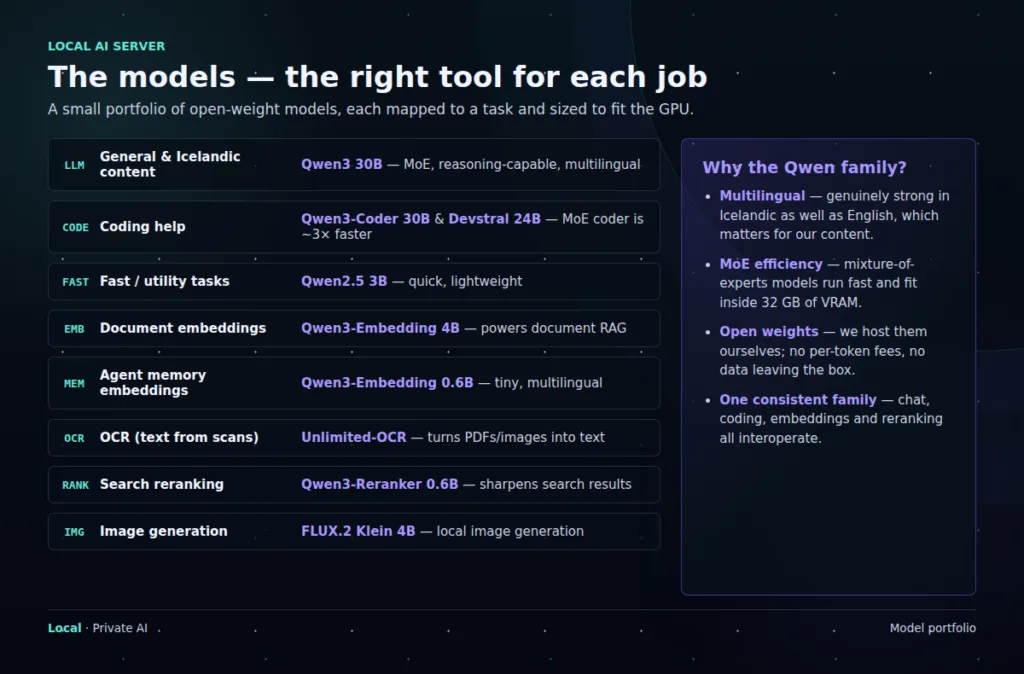
Qwen models do much of the general work because they perform well in both Icelandic and English. In our coding tests, the mixture-of-experts coder ran about three times faster than a comparable dense model at similar quality. Smaller models handle embeddings and reranking; separate tools take care of OCR and image generation.
This is also easier to change. If a better embedding model appears, we can replace that part without rebuilding the rest of the platform.
Memory is not one thing
We separate an agent’s working memory from the company’s document knowledge. They solve different problems and should not quietly bleed into each other.
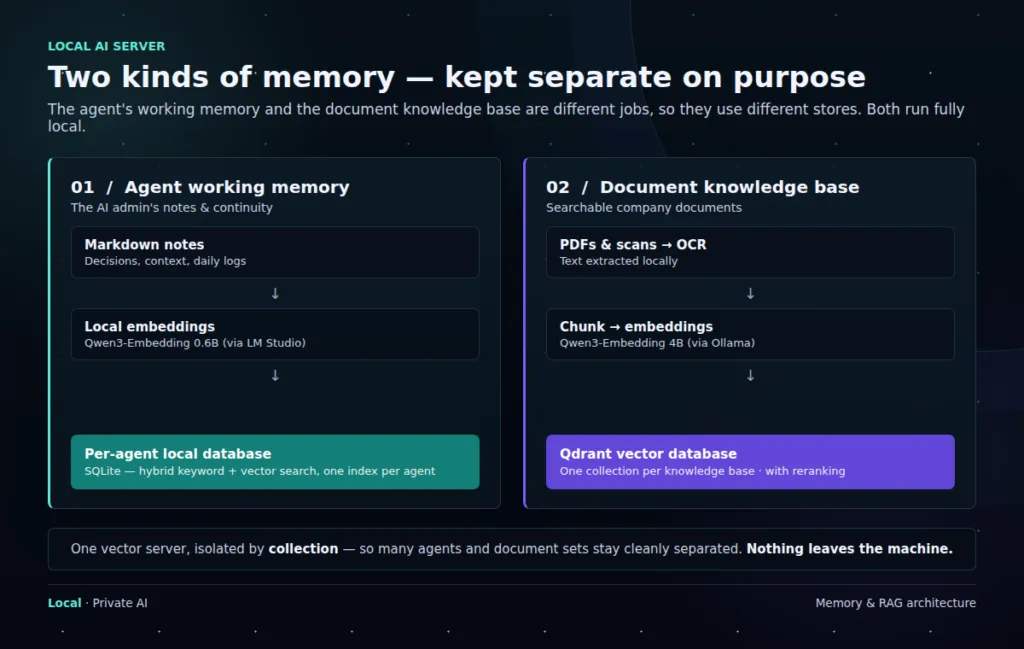
Working memory contains decisions, current context, and running notes. It gives an agent continuity between sessions. Each agent gets its own memory space rather than a shared pool of everything the company has ever told an AI.
The document knowledge base contains approved company material. PDFs and scans pass through OCR, are split into chunks, embedded locally, and stored in Qdrant. When someone asks a question, only the most relevant passages are retrieved and sent to the model.
One vector server can hold many isolated collections. Shared infrastructure is fine. Shared context by default is not.
The next layer: governance by role
Local hosting answers where the data is processed. It does not answer who may use it or what an agent may do with it. The next stage of this build is an enterprise-style management layer in which every agent has a named role, an owner, an approved data scope, and a limited set of tools.
We will use the Agentic Architect certification framework published through Google Skills as one external reference when we wireframe this operating model. It is useful as a design check, not as a substitute for our own data policy. The policy still has to reflect our systems, legal obligations, and actual risks.
| Agent role | Data boundary | Action boundary | Management rule |
|---|---|---|---|
| Research | Approved document collections and public sources | Read and draft only | Sources recorded; no external publishing |
| Content | Brand files, editorial archive, and assigned projects | Create and edit drafts | A person approves publication |
| Operations | Selected service status, logs, and runbooks | Run allowlisted maintenance tasks | Risky or destructive actions require approval |
| Administration | Minimum configuration and identity data needed for the task | Manage narrowly defined systems | Short-lived credentials, full audit trail, regular access review |
The same controls apply to every role. Data is classified before it enters a knowledge base. Access follows least privilege. Memory retention has an expiry rather than lasting forever. Credentials are kept outside prompts and memory. Tool calls are logged, and permissions can be revoked without rebuilding the agent.
One practical rule: an agent should never gain access to data simply because another agent on the same server can see it.
Roles are boundaries, not labels. Each one needs its own identity, data collections, tool permissions, approval gates, retention policy, and audit history.
Privacy includes operations
The server is available through an encrypted private network, not a public AI endpoint. Coworkers use one authenticated interface. Model services, databases, and internal tools are not exposed directly. Documents, chunks, embeddings, retrieval, and inference remain local.
That is the visible part of privacy. The less visible part is operational: keeping internal addresses and credentials out of diagrams, reviewing access, removing old data, testing backups, and knowing who changed what.
The unglamorous part
Loading a model was not the difficult job. Making the whole stack return cleanly after an unattended reboot took far more work. Windows, WSL2, Docker, networking, time synchronization, model servers, and the application layer all need an explicit startup order.
Recovery needs the same care. Databases are dumped nightly, the vector store is snapshotted, older copies are retained according to policy, and backups are replicated away from the workstation. We also test restores. A backup that has never been restored is still a theory.
What this build taught me
The hardware constraint helped. It forced us to choose models deliberately, separate fast storage from archive storage, and use retrieval instead of endlessly chasing larger fine-tunes.
The more important lesson came later: a local model is only a component. A dependable AI system also needs identity, data boundaries, recovery, and human approval at the right moments. Without those, “private AI” is mostly a location claim.
The workstation now supports private chat, coding help, Icelandic and English content, document search, image generation, and automation. The next job is to make every agent as clearly governed as the server itself.
Built and maintained in-house.