Category: Self-hosted LLMs

A practical branch for running, choosing, and understanding local large language models.

  • One Box, Private by Design: Inside a Local AI Server

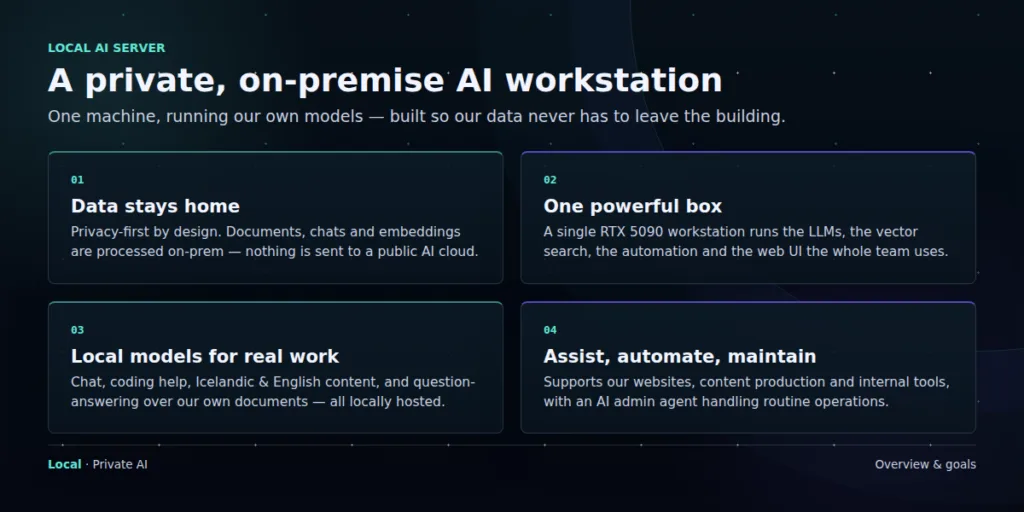
    I wanted to find out how much useful AI infrastructure a small company could run on one machine, without turning every document, draft, and internal conversation into somebody else’s cloud data.

    The answer is: quite a lot. But the interesting part is not the model or the graphics card. It is the system around them: where data lives, who can reach it, what an agent is allowed to do, and how the whole thing recovers after a bad update or an unattended reboot.
    The brief

    This was never a project about owning the biggest model. I wanted a private system that could work in Icelandic and English, help with code and content, search company documents, maintain websites, and take care of routine operations.

    The useful question is not, “What is the largest model we can run?” It is, “What work can we trust this system to do?”

    That last word matters. Trust does not come from keeping a model in the building. It comes from access rules, visible logs, separate data spaces, backups, and clear limits on what each agent can do.

    The machine sets the boundary

    The workstation is built around an NVIDIA RTX 5090 with 32 GB of VRAM. It also has a Ryzen 9 9950X, 128 GB of system memory, fast NVMe storage, an archive drive, and a 1350 W power supply. Those parts support the platform, but GPU memory sets the practical limit.
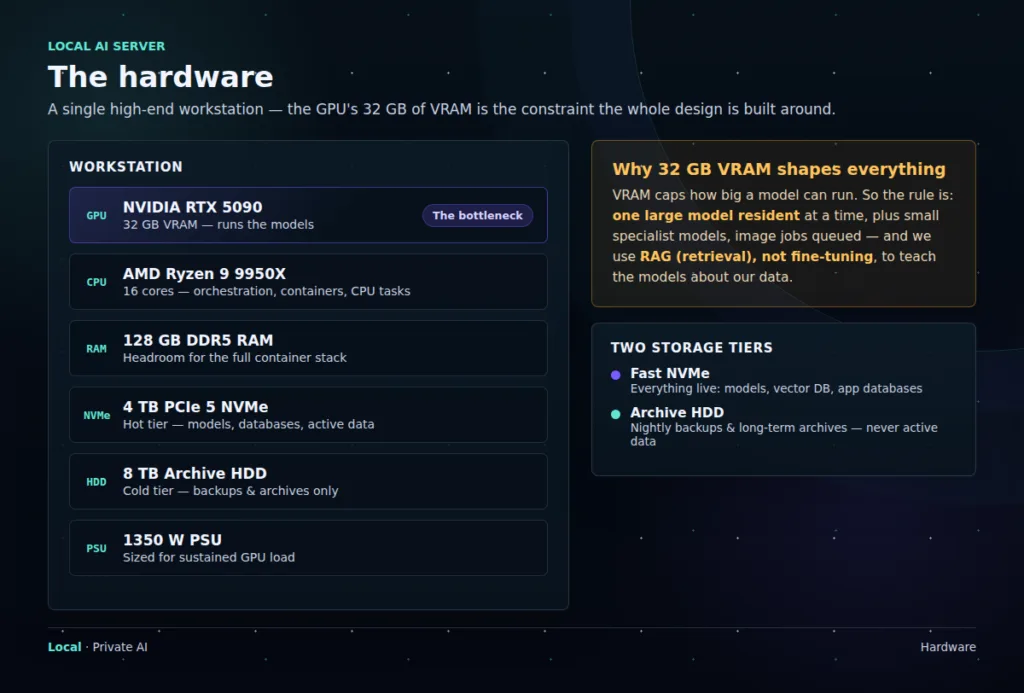
    A model that fits in VRAM feels immediate. A model that spills into system memory does not. In normal use, one larger model stays loaded while smaller specialists handle narrow jobs. Image generation is queued so it does not fight the language model for memory.

    The same thinking applies to storage. Models, live databases, and active vector indexes belong on NVMe. The larger hard drive is for backups and long-term archives. It has plenty of capacity, but I do not ask it to behave like a database disk.

    The main technical choice: company knowledge is retrieved when a question is asked. It is not baked into a fine-tuned model.

    Retrieval uses less GPU memory, costs less to maintain, and lets us update or remove source material without retraining anything.

    One system, split in two

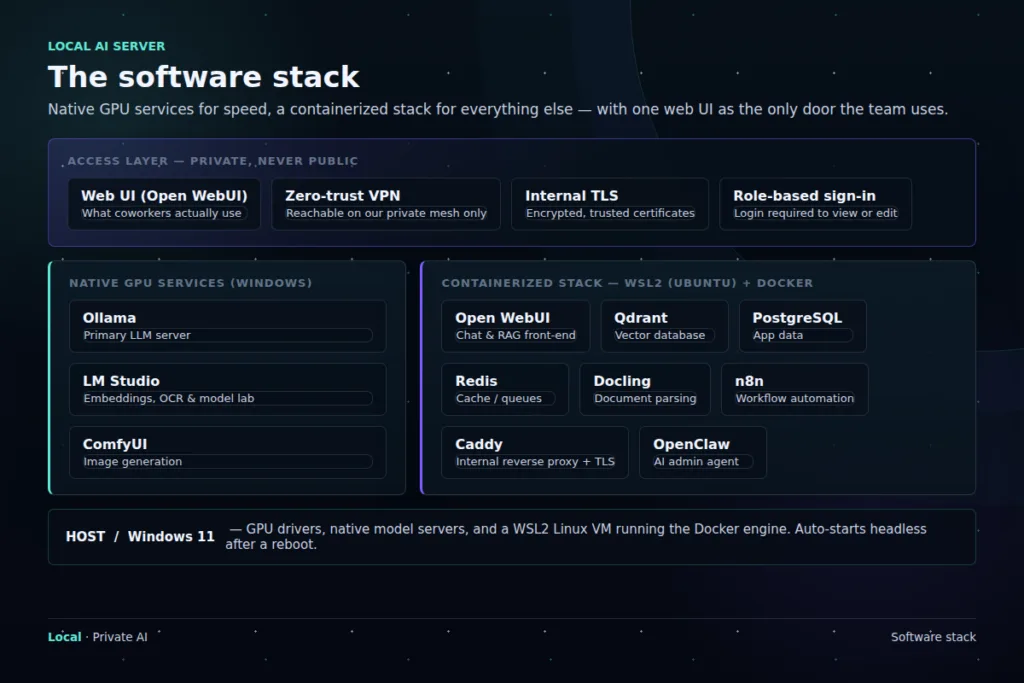
    The software stack has an intentional divide. Services that need direct GPU access run natively on Windows. The rest runs in WSL2 and Docker, where it is easier to isolate, reproduce, back up, and restore.
    Native Windows

    Ollama serves the main language models. LM Studio handles embeddings, OCR, and experiments. ComfyUI runs local image generation.

    WSL2 and Docker

    Open WebUI, Qdrant, PostgreSQL, Redis, Docling, n8n, Caddy, and OpenClaw make up the supporting platform.

    The people using it do not need to know which side a service runs on. They sign in through one interface on the private network. The untidy engineering details stay behind that front door.

    Different models for different jobs

    Trying to make one enormous model do everything would waste memory and make the system harder to operate. Instead, the server uses a small set of open-weight models selected for specific jobs.
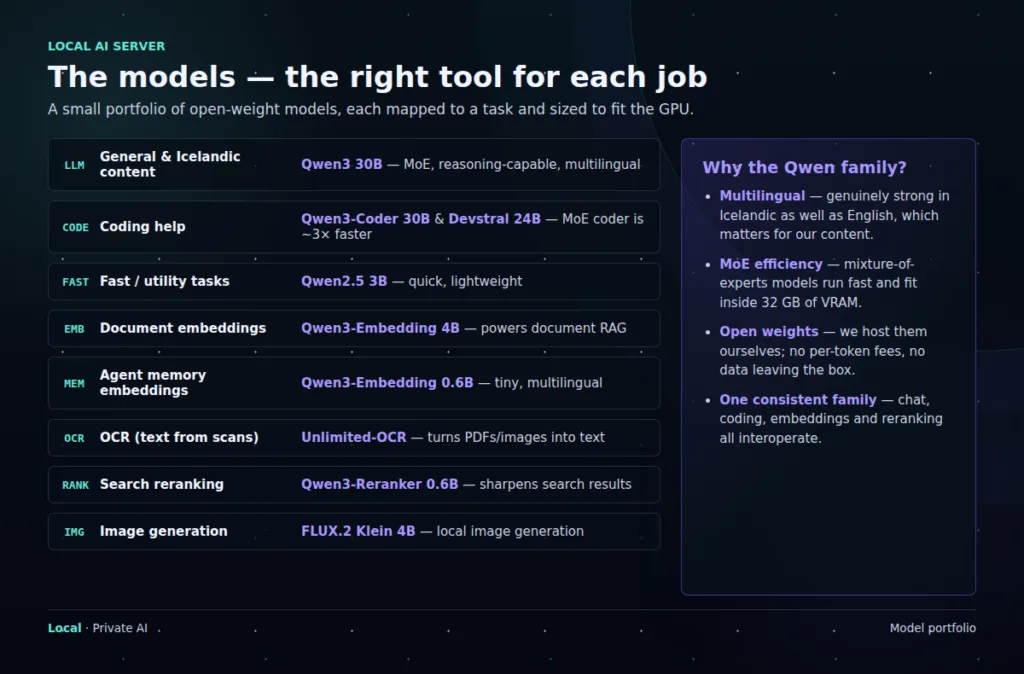
    Qwen models do much of the general work because they perform well in both Icelandic and English. In our coding tests, the mixture-of-experts coder ran about three times faster than a comparable dense model at similar quality. Smaller models handle embeddings and reranking; separate tools take care of OCR and image generation.

    This is also easier to change. If a better embedding model appears, we can replace that part without rebuilding the rest of the platform.

    Memory is not one thing

    We separate an agent’s working memory from the company’s document knowledge. They solve different problems and should not quietly bleed into each other.
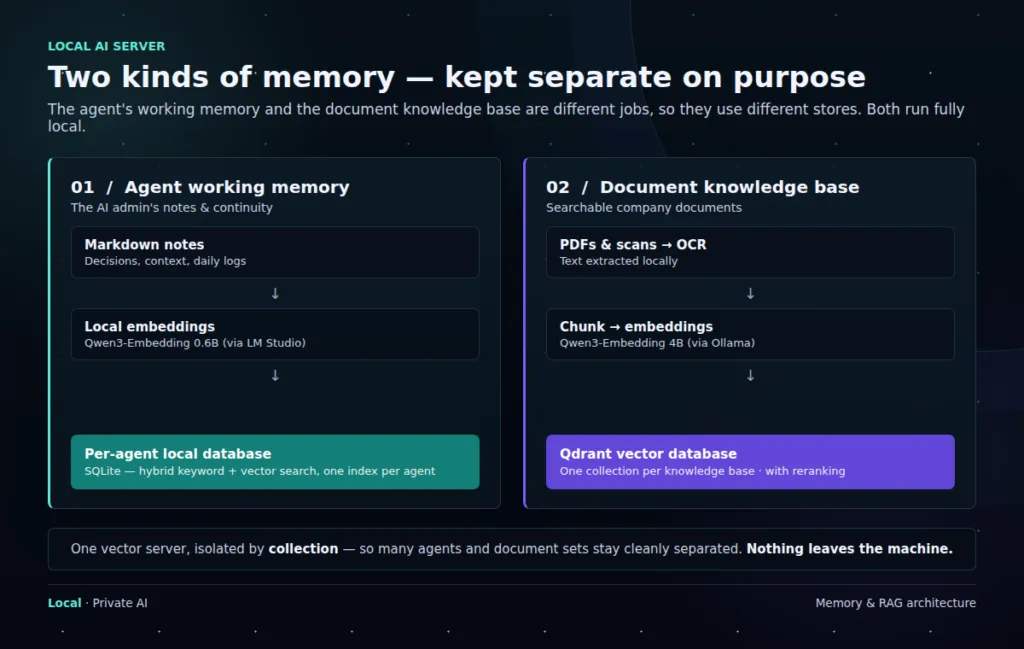
    Working memory contains decisions, current context, and running notes. It gives an agent continuity between sessions. Each agent gets its own memory space rather than a shared pool of everything the company has ever told an AI.

    The document knowledge base contains approved company material. PDFs and scans pass through OCR, are split into chunks, embedded locally, and stored in Qdrant. When someone asks a question, only the most relevant passages are retrieved and sent to the model.

    One vector server can hold many isolated collections. Shared infrastructure is fine. Shared context by default is not.

    The next layer: governance by role

    Local hosting answers where the data is processed. It does not answer who may use it or what an agent may do with it. The next stage of this build is an enterprise-style management layer in which every agent has a named role, an owner, an approved data scope, and a limited set of tools.

    We will use the Agentic Architect certification framework published through Google Skills as one external reference when we wireframe this operating model. It is useful as a design check, not as a substitute for our own data policy. The policy still has to reflect our systems, legal obligations, and actual risks.

    Agent roleData boundaryAction boundaryManagement rule
    ResearchApproved document collections and public sourcesRead and draft onlySources recorded; no external publishing
    ContentBrand files, editorial archive, and assigned projectsCreate and edit draftsA person approves publication
    OperationsSelected service status, logs, and runbooksRun allowlisted maintenance tasksRisky or destructive actions require approval
    AdministrationMinimum configuration and identity data needed for the taskManage narrowly defined systemsShort-lived credentials, full audit trail, regular access review

    The same controls apply to every role. Data is classified before it enters a knowledge base. Access follows least privilege. Memory retention has an expiry rather than lasting forever. Credentials are kept outside prompts and memory. Tool calls are logged, and permissions can be revoked without rebuilding the agent.

    One practical rule: an agent should never gain access to data simply because another agent on the same server can see it.

    Roles are boundaries, not labels. Each one needs its own identity, data collections, tool permissions, approval gates, retention policy, and audit history.

    Privacy includes operations

    The server is available through an encrypted private network, not a public AI endpoint. Coworkers use one authenticated interface. Model services, databases, and internal tools are not exposed directly. Documents, chunks, embeddings, retrieval, and inference remain local.

    That is the visible part of privacy. The less visible part is operational: keeping internal addresses and credentials out of diagrams, reviewing access, removing old data, testing backups, and knowing who changed what.

    The unglamorous part

    Loading a model was not the difficult job. Making the whole stack return cleanly after an unattended reboot took far more work. Windows, WSL2, Docker, networking, time synchronization, model servers, and the application layer all need an explicit startup order.

    Recovery needs the same care. Databases are dumped nightly, the vector store is snapshotted, older copies are retained according to policy, and backups are replicated away from the workstation. We also test restores. A backup that has never been restored is still a theory.

    What this build taught me

    The hardware constraint helped. It forced us to choose models deliberately, separate fast storage from archive storage, and use retrieval instead of endlessly chasing larger fine-tunes.

    The more important lesson came later: a local model is only a component. A dependable AI system also needs identity, data boundaries, recovery, and human approval at the right moments. Without those, “private AI” is mostly a location claim.

    The workstation now supports private chat, coding help, Icelandic and English content, document search, image generation, and automation. The next job is to make every agent as clearly governed as the server itself.

    Built and maintained in-house.

  • LLMFit: Every Model Your Hardware Can Run

    Everyone who self-hosts models has asked the same question in a different costume: what can this machine actually run? LLMFit answers it directly. Point it at your hardware and it lists every model that fits, ranked by how well it fits, with links to download the exact file.

    From guessing to knowing

    The usual way to pick a local model is folklore: a Reddit comment, a half-remembered benchmark, a VRAM table on a wiki. LLMFit replaces that with a scan. It reads your GPU, memory, and CPU, then matches them against the model catalog so you stop downloading files your hardware was never going to enjoy.

    The best model is not the biggest one. It is the biggest one your machine runs well.

    What it shows

    For each model, LLMFit tells you whether it fits, how comfortably, and at which quantization. That turns the Q4-versus-Q8 debate into a concrete answer for your specific box instead of an average answer for someone else’s.

    Before LLMFit

    Guess a size, download gigabytes, watch it crawl, delete, repeat.

    After LLMFit

    See every capable model for your hardware up front, pick the best fit, download once.

    Where it sits in the stack

    LLMFit is the step before the runtime. Run it first, then hand the winning file to Ollama, LM Studio, or llama.cpp. It pairs naturally with the model cards on Hugging Face: the card tells you what the model is, LLMFit tells you whether it is for you.

    Try it: the source and downloads live at github.com/AlexsJones/llmfit. One scan replaces an afternoon of trial and error.

  • VRAM, Context, and Speed: The Local LLM Triangle

    Local LLM performance usually comes down to a triangle: model size, context length, and speed. You can push one corner, but the other corners will feel it.

    VRAM is not just where the model lives. It is also where the conversation starts to take up space.

    Model Size

    A larger model can understand more, write better, and make fewer strange mistakes. But if it barely fits, it may run slowly, spill into system RAM, or leave no room for a useful context window.

    Context Length

    Context is how much text the model can consider at once. Long context is useful for documents, codebases, transcripts, and agents. But a huge context window is not free. It uses memory and can slow the session down.

    A 128k context window is powerful only when the hardware and the task can afford it.

    Small and fast

    Good for quick replies, summaries, classification, drafts, and everyday local assistants.

    Large and deep

    Better for harder reasoning and long documents, but usually slower and more demanding.

    The Daily Driver Test

    Ask the same real task across two or three models: one small, one medium, one ambitious. Time the answers. Read them side by side. The winner is often not the largest model. It is the model you will tolerate using all day.

    For self-hosting, comfort matters: enough quality, enough speed, enough context, and no constant fighting with memory.

    Shortcut: LLMFit shows all capable models for your hardware based on what is actually available, ranked by fit, which collapses this whole triangle into one scan.

  • Model Watch: What Matters in Open Models Now

    The open model world moves quickly. A Hugging Face trending page can change between morning coffee and the end of the day.

    The useful habit is not chasing every model. It is learning which signals matter for your own setup.

    Signals Worth Watching

    Watch for better small models, stronger coding models, efficient long-context releases, multimodal models that can read images or documents, and high-quality GGUF builds from reliable publishers.

    Families like Qwen, GLM, Gemma, Mistral, Llama, Solar, DeepSeek, and coder-focused releases are worth keeping on the radar, but the family name alone is not enough. The exact size, license, fine-tune, quantization, and runtime support matter more.

    A model release is interesting only after it survives your own tasks.

    Trend signal

    Downloads, likes, discussion, benchmarks, release notes, and whether trusted builders are quantizing it.

    Real signal

    Your prompts, your language, your documents, your code, your hardware, and whether the answers improve your workflow.

    A Simple Test Bench

    Keep a small folder of repeatable prompts: one writing task, one coding task, one document question, one reasoning question, and one refusal/safety edge case. When a model looks promising, run the same bench and compare it with your current daily driver.

    The model feed is weather. Your own test bench is climate.

  • Terms That Unlock Self-hosted LLMs

    Self-hosted LLMs come with a lot of vocabulary. Most of it sounds harder than it is because the words arrive before the mental picture.

    Once the core terms click, the whole stack becomes easier to navigate.

    The Model Words

    Parameters are the learned weights inside the model. More parameters can mean more capability, but also more memory. Instruct usually means the model has been tuned to follow directions. Base means it is closer to the raw pretrained model and usually less friendly for chat.

    The Memory Words

    Context window is how much text the model can consider at once. Tokens are the pieces of text the model reads and writes. VRAM is GPU memory, and it becomes one of the main limits when running models locally.

    Tokens are the meter. Context is the room. VRAM is the floor space.

    The File Words

    GGUF

    A local-friendly model file format commonly used with llama.cpp-based tools.

    Quantization

    A way to shrink model weights so larger models can fit on smaller hardware.

    The System Words

    Runtime is the software that runs the model. Embedding is a numeric representation of meaning. RAG is the pattern where your documents are searched first, then relevant pieces are sent to the model.

    You do not need to master the whole vocabulary at once. Learn the terms that explain the next problem in front of you.

  • Private Knowledge: RAG With a Local Model

    A local model becomes much more useful when it can answer from your own notes, manuals, transcripts, PDFs, and project folders.

    This is where RAG turns self-hosting from a private chatbot into a private knowledge system.

    The Local RAG Loop

    Your documents are split into chunks. Each chunk is turned into an embedding. Those embeddings are stored in a local vector database or search index. When you ask a question, the system searches for the closest chunks and adds them to the prompt.

    The model does not need the whole library. It needs the right shelf.

    Plain local chat

    Private and fast to start, but it only knows what is in the prompt and the model weights.

    Local RAG

    Private plus searchable memory, useful for documentation, internal knowledge, research, and support workflows.

    What to Keep Local

    Good candidates are notes you revisit, client-safe documentation, product information, code explanations, meeting transcripts, and small knowledge bases. Bad candidates are messy dumps with no structure, duplicated files, and documents you never want the system to quote.

    A private model plus a clean retrieval layer is often more useful than a larger model with no access to your actual knowledge.

  • Start Here: Self-hosted LLMs

    Self-hosting an LLM means running the model on hardware you control: a laptop, workstation, home server, VPS with a GPU, or a machine reached over a private network.

    The goal is not to replace every cloud model. The goal is to know when local control is the better tool.

    A local model is less like a magic service and more like an engine you keep in your own workshop.

    Why People Run Models Locally

    The obvious reason is privacy. Prompts, documents, transcripts, notes, and business data can stay on your own machine. That matters when the work is sensitive, unfinished, or simply nobody else’s business.

    The second reason is control. You can choose the model, keep a stable version, test different quantizations, connect it to local tools, and build habits around one setup instead of chasing every new API release.

    Cloud Model vs Local Model

    Cloud

    Usually stronger, easier to start, and better for heavy reasoning, big multimodal tasks, and production APIs.

    Local

    Private, repeatable, cheaper at small scale, and good for drafting, coding help, search over notes, classification, and experiments.

    The Simple Stack

    A beginner setup can be very small: install Ollama or LM Studio, download a model, open a chat UI, and start testing. A more serious setup adds Open WebUI, a private network such as Tailscale, a document index, monitoring, and backups.

    Start with one small model that runs comfortably. A fast model you actually use teaches more than a giant model that barely fits in memory.

  • Where Models Live: Hugging Face, GGUF, and Model Cards

    Most open model discovery starts on Hugging Face. It is part library, part release feed, part workshop shelf.

    The model name is only the label. The model card is where the useful truth usually lives.

    What to Check First

    Before downloading a model, check what it is built for. Is it a chat model, a coder, an embedding model, a vision model, or a fine-tuned experiment? A strong coder can feel odd in general chat. A small chat model can be pleasant but weak at long technical work.

    Then check the license, parameter size, context length, base model, training notes, and examples. If the card is empty, confusing, or evasive, treat that as a signal.

    Do not download the trend. Read the card.

    HF Model vs GGUF File

    Original model

    Often published in formats used by PyTorch, Transformers, or production inference stacks.

    GGUF build

    A llama.cpp-friendly package, often quantized so it can run on laptops, desktops, and smaller servers.

    Use Trending as Radar

    The Hugging Face trending page is useful, but it changes fast. It can surface serious releases, research drops, fine-tunes, OCR models, coders, uncensored variants, and experimental merges in the same stream.

    For self-hosting, the practical question is not “What is number one today?” It is: does this model fit my hardware, my license needs, my language, and my task?

    A good model choice starts with the task: chat, code, search, images, agents, or documents. The download comes after that.

  • GGUF and Quantization: The File That Makes Local Models Fit

    When people first browse local models, the file names can look like radio static: Q4_K_M, Q5_K_S, Q8_0, GGUF, instruct, coder, 32k, 128k.

    Most of that noise is about one question: how much model quality can fit inside the memory you actually have?

    What GGUF Is

    GGUF is a model file format used by llama.cpp and many local tools built around it. Ollama, LM Studio, and other desktop-friendly runtimes often make GGUF models feel simple, even when the file underneath is doing a lot of work.

    GGUF is the package. Quantization is the squeeze.

    What Quantization Does

    Quantization stores the model weights with fewer bits. That makes the file smaller and easier to run, but it can reduce quality. The trick is finding the point where the model is still good enough and finally fast enough.

    Lower quant

    Smaller file, less memory, faster start. More risk of weaker reasoning or rougher writing.

    Higher quant

    Larger file, more memory, usually better fidelity. Better when the hardware can breathe.

    A Practical Rule

    For a first test, Q4 is often the entry point. Q5 can be a nicer daily balance. Q8 is closer to the original model but needs more memory. Bigger is not automatically better if it makes every answer painfully slow.

    The best local model is usually the one that fits comfortably, responds quickly, and is good enough for the task you repeat every day.

    Skip the math: LLMFit scans your machine and lists every model that fits it, at each quantization, so the tradeoff table becomes a concrete answer for your hardware.

  • Choosing a Local Runtime: Ollama, LM Studio, llama.cpp, vLLM

    A model file by itself does nothing. The runtime loads it, manages memory, accepts prompts, streams tokens, and exposes the model to a chat app or API.

    Choosing a runtime is really choosing how much control you want and how much setup you are willing to carry.

    The Friendly Layer

    Ollama is often the easiest first step. Install it, pull a model, run a command, and you have a local API. LM Studio is friendly in a different way: it gives you a desktop interface for browsing, downloading, chatting, and serving models locally.

    The Engine Room

    llama.cpp sits closer to the metal. It is the engine behind a lot of local GGUF workflows and is useful when you want flags, experiments, and direct control. vLLM lives more on the server side, especially when throughput, batching, and multi-user serving start to matter.

    The runtime is where the model becomes infrastructure.

    Personal setup

    Ollama or LM Studio, often with Open WebUI on top for a nicer private chat surface.

    Service setup

    llama.cpp server, vLLM, containers, private networking, logs, health checks, and access controls.

    Start Boring

    If you are new, start with Ollama or LM Studio. Once you know what is slow, what breaks, and what you want to automate, the lower-level tools will make more sense.

    Do not optimize the engine before you know what you are driving: chat, code, RAG, agents, or a small internal API.