Author: Agust Gudbjornsson

  • 5-Step Prompt Framework

    A normal chat prompt can be loose. A long-running agent prompt cannot.
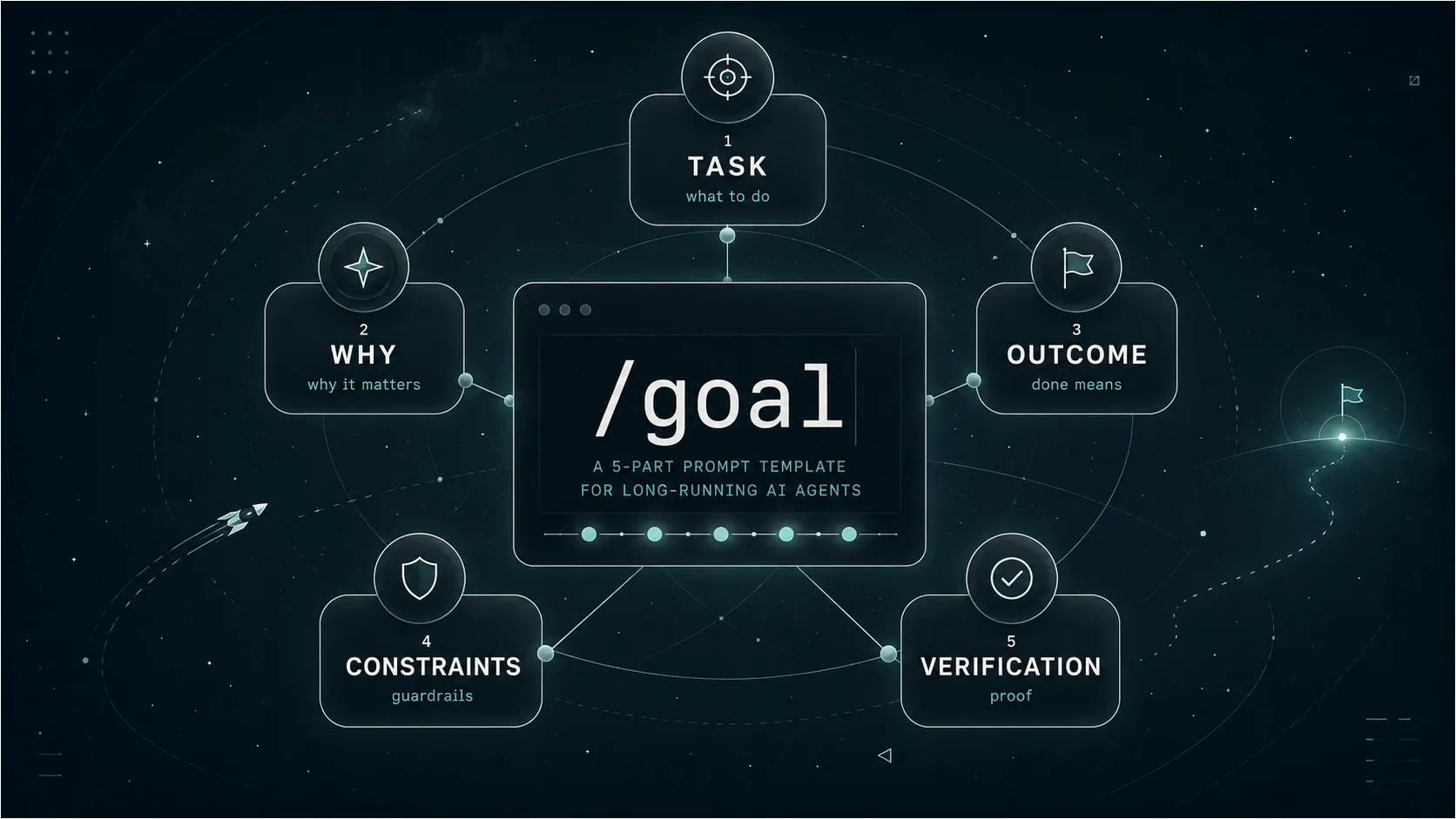
    When an AI agent is expected to work through several steps, use tools, make decisions, correct mistakes, and keep going until the job is finished, it needs more than a simple instruction. It needs a destination, boundaries, and a way to prove that the result is actually complete.

    For agent work, the prompt is less like a message and more like a brief.

    For longer tasks in Claude Code, OpenClaw, or any tool-using agent, I use a simple five-part structure.

    The framework: Task, Why, Outcome, Constraints, Verification.

    Those five pieces are enough to turn a vague request into something an agent can actually finish.

    /goal
    
    TASK:
    [What the agent should do]
    
    WHY:
    [Why the task matters and who it is for]
    
    OUTCOME:
    [The exact finished result]
    
    CONSTRAINTS:
    [What the agent must or must not do]
    
    VERIFICATION:
    [How the agent should prove the work is complete]

    Loose Prompt

    Before

    Improve my website.

    The agent has to guess the goal, audience, scope, and finish line.

    Agent Brief

    After

    Review the homepage, rewrite the structure and copy, keep the existing brand, and verify the result on mobile and desktop.

    The agent knows what to change, what to protect, and how to prove the work.

    1. Task

    The task is the action.

    Start with a clear verb and describe what you want the agent to do. This section should be direct. It is not the place for a long backstory.

    Instead of:

    Improve my website.

    Write:

    Review the homepage, identify the main usability problems, and rewrite the page structure and copy.

    The clearer the action is, the easier it is for the agent to begin in the right direction.

    2. Why

    The why gives the agent context.

    Explain why the work matters, who it is for, and what problem you are trying to solve. This helps the agent make better decisions when it encounters details that were not covered in the original prompt.

    This homepage is for small business owners who are interested in AI but do not have a technical background. It should make the service feel useful and easy to understand.

    Without this context, the agent may produce something technically correct but wrong for the intended audience.

    3. Outcome

    The outcome defines the finish line.

    Describe the completed result clearly enough that both you and the agent can recognise when the task is done.

    Avoid vague instructions such as:

    Make it look professional.

    A stronger outcome would be:

    Deliver a finished homepage structure with a headline, supporting introduction, three content sections, two calls to action, and notes for the mobile layout.

    The agent should not have to guess what finished means.

    4. Constraints

    Constraints are the guardrails.

    They define what the agent may change, what it must leave alone, which tools it can use, and where it should stop.

    Do not change the database structure.
    
    Keep the existing brand tone.
    
    Use only the files already available in the project.
    
    Do not publish or deploy anything.
    
    Stop after three review and revision passes.

    Be direct here. Important limits should not be hidden inside a long paragraph.

    A good constraint prevents the agent from solving the right problem in the wrong way.

    5. Verification

    Verification is how the agent proves the result.

    This is often the hardest part to write, but it is also one of the most important.

    Do not ask the agent to simply tell you that the work is complete. Ask it to test, inspect, compare, or score the result against a measurable standard.

    Verification should produce evidence, not confidence.

    Instead of:

    Check that everything works.

    Write:

    Test every form, confirm that all links work, review the layout at mobile and desktop widths, and provide a list of any remaining issues.

    A Complete Example

    Here is what the full structure could look like for a website task:

    /goal
    
    TASK:
    Review the current homepage and rewrite its structure and copy.
    
    WHY:
    The page is aimed at small business owners who are curious about AI but may find the subject technical or confusing. The page should make the service feel practical, useful, and approachable.
    
    OUTCOME:
    Deliver a complete homepage outline containing a headline, introduction, three benefit sections, a short process section, frequently asked questions, and two calls to action.
    
    CONSTRAINTS:
    Keep the existing company name and core services.
    Do not invent customer testimonials or statistics.
    Use clear language and avoid unnecessary technical terminology.
    Do not publish or modify the live website.
    
    VERIFICATION:
    Confirm that every section has a clear purpose.
    Check that the main service can be understood within the first screen.
    Review the copy for repeated ideas and unnecessary jargon.
    Provide a final checklist showing how the result meets each outcome and constraint.

    The Important Part

    The most difficult part is usually not writing the task. It is defining the outcome and verification.

    Make it good is not a finish line.

    Score at least 8 out of 10 using a defined review checklist, fix every critical issue, and provide the final test results is much closer to one.

    For long-running AI agents, a good prompt should answer five questions:

    What should be done? Why does it matter? What does finished look like? What are the boundaries? How will success be proven?

    That is often enough to turn a vague request into a task an agent can actually complete.

  • Embedding Vector

    When people talk about vectors in LLMs, it can sound technical at first, but the idea is surprisingly close to the word vector from graphic design.

    An embedding vector is how an AI system turns meaning into numbers so it can search, compare, and understand content more effectively.

    From Shape to Meaning

    In graphic design, a vector is a mathematical description of a shape. Instead of storing pixels, a vector file stores points, curves, lines, direction, and scale. That is why a vector logo can be resized without losing quality.

    In LLMs and AI, a vector is also a mathematical description, but instead of describing a visual shape, it describes meaning.

    A visual vector describes form. An embedding vector describes meaning.

    What an Embedding Vector Actually Is

    An embedding vector is a list of numbers that represents the meaning of a word, sentence, paragraph, image, or document.

    A sentence like “How do I change a car battery?” can be converted into a long list of numbers, something like:

    [0.12, -0.44, 0.83, 0.05, ...]

    In real systems, that list may contain hundreds or even thousands of values. The exact numbers are not important for us as humans. What matters is where that vector sits compared to other vectors.

    Why Distance Matters

    Texts with similar meaning end up close to each other in vector space, even when they do not use the exact same words.

    Close together

    “How do I change a car battery?”
    “Steps to replace a vehicle battery”
    “Car battery removal guide”

    Far apart

    “How to bake sourdough bread”
    “Best camera lens for weddings”
    “History of Icelandic fishing”

    This is the key reason vector search is useful. It lets a system compare content by meaning, not just by exact keyword matches.

    Why It Matters in RAG

    This is also one of the core ideas behind RAG, or Retrieval-Augmented Generation. In a RAG setup, your documents are split into smaller chunks, and each chunk is converted into an embedding vector.

    When someone asks a question, that question is also turned into a vector. The system then searches for the chunks whose vectors are closest in meaning to the question, and only those relevant pieces are sent to the LLM.

    So instead of pushing an entire PDF, manual, website, or document library into the model every time, the system finds the most relevant parts first.

    A Simple Design Analogy

    Imagine all your text content placed on a giant invisible artboard. Similar topics naturally cluster together. Car battery instructions sit in one area, WordPress errors in another, roof tent specifications somewhere else, and cooking instructions far away in a different corner.

    An embedding vector is like the coordinate that tells the system: this piece of content belongs around here.

    In simple terms, an embedding vector is a numeric representation of meaning. That is why vector search can understand that “replace a car battery” and “change a vehicle battery” are almost the same request, even though the wording is different.

  • Retrieval-Augmented Generation (RAG)

    When people start learning about LLMs and AI, one of the first questions is: “Why can’t I just upload all my documents into ChatGPT or Claude and ask questions?”

    For one small PDF, that can work fine. A big-context model can read the file and answer from it. But when you start working with lots of PDFs, manuals, policies, product data, or business knowledge, this approach quickly becomes slow, expensive, and messy.

    That is where RAG comes in.

    What RAG Actually Does

    RAG stands for Retrieval-Augmented Generation. The idea is simple: instead of sending the entire document to the LLM every time, you first search your document store for the parts that are actually relevant. Then only those small chunks are sent to the model.

    Normal LLM vs. RAG

    Normal setup

    You ask a question → the model answers from its training data.

    RAG setup

    You ask a question → a retrieval system searches your documents → the most relevant chunks are added to the prompt → the LLM answers using that context.

    Why It’s Better

    The biggest benefit is that the model does not need to read everything every time. Instead of sending 100 pages from a PDF, you might only send the 5–10 chunks that matter. That makes the setup cheaper, because sending huge documents to GPT or Claude again and again costs more. It also makes it faster, because searching a vector database is quick compared to asking the model to read a full document every time.

    RAG is also useful for accuracy. If the answer is hidden in a tiny paragraph on page 73, a large-context model might still miss it. A good retrieval setup can find that paragraph first and place it directly in front of the model.

    Another big advantage is that the index is reusable. You can embed a PDF once, store it, and then ask 100 questions against it without processing the whole file again. The same method can also work across thousands of documents, where the system searches everything and only sends the relevant pieces to the chat model.

    The Simple Version

    • For one small document, a big-context model might be enough.
    • For many documents, changing files, manuals, internal knowledge, product data, or business information, RAG is usually the better setup.

    It gives the LLM the right information at the right time, without forcing it to carry the whole library in every single prompt.

  • OpenClaw

    Since February, when OpenClaw first made headlines, it has gained serious momentum — and, in many ways, new superpowers.

    With help from users and contributors around the world, OpenClaw has shown two important things:

    What OpenClaw Has Proven

    1. Open-source projects can compress what would normally take months, or even years, of trial and error into just a few intense months of progress.
    2. OpenClaw has changed the agent market. It gives users a level of flexibility and freedom that feels truly unlimited when it comes to resources, workflows, and infrastructure.

    My Experience

    I now use OpenClaw across all my VPS servers, as well as on my home server. When I started, I only had basic Linux knowledge. But by working with tools like OpenClaw, I have gained a much deeper understanding of the CLI, servers, services, logs, and automation. That knowledge has saved me a huge amount of time in many different ways.

    If you are curious about agents, automation, or running your own AI-powered workflows, I highly recommend getting to know OpenClaw. Spin it up on a VPS and try it for yourself.

    For VPS hosting, I personally recommend Hetzner — especially if you are located in Europe.